
Apple Fitness, only if you choose it
Padelly can record the match as a workout and show available heart rate and active energy. Health permission is not required for scoring.
Padel score app for Apple Watch
Padelly turns Apple Watch into a focused padel scorekeeper. Start a new match on Watch or pick up a plan from iPhone, choose the first serving team, then record each point with large controls.
Start at the wrist
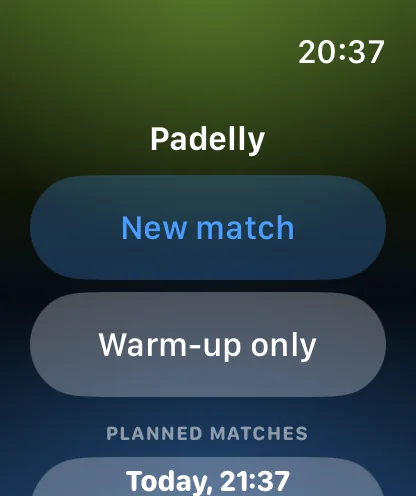
Start a new match on Watch, warm up first, or choose a match planned on iPhone. Every route leads to the same clear live score.
Built for live play
The live Watch screen keeps the two scoring zones easy to hit during a rally break. Elapsed time and the current score stay visible, while serving information follows the rules of the selected format. If the wrong team receives a point, undo restores the score and serving state, even across a completed game, set, or tie-break.
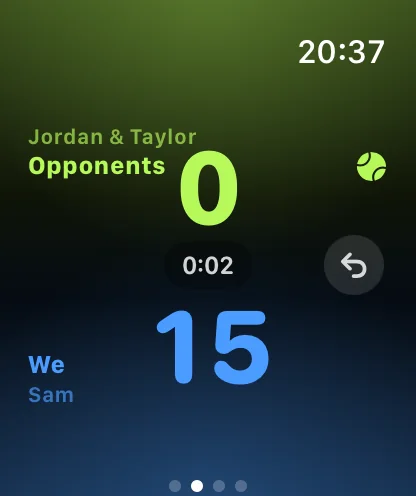
Once a match goes live on Apple Watch, the Watch keeps the complete match state locally after every action. If the iPhone is temporarily unreachable, scoring continues normally. When the match ends, the Watch sends the final result; if the phone is still unreachable, delivery waits safely until it can reconnect.
Set match rules directly on Apple Watch, or prepare a match with player names on iPhone. Choose singles or doubles, your deuce rule, set structure, and games per set.
Padelly can record the match as a workout and show available heart rate and active energy. Health permission is not required for scoring.
Player names, scores, history, and settings stay local. The app has no Padelly login, analytics, advertising, tracking, or custom cloud backend.
No. Start a new match on Watch, or prepare one on iPhone. A temporary phone disconnection does not stop scoring.
Yes. Padelly’s bounded undo history restores score and serving details across game, set, and tie-break boundaries.
No. Live scoring is local and is never gated on a network connection.
Yes. Fitness tracking can be off, unavailable, or denied without affecting scoring or match history.